
读写 CSV 文件
示例文件:
csv_cleaning.py
示例核验:2026-10-20(Python 3.14,语法下限为 3.10)
这篇解决什么问题
客户发来的 CSV 需要被脚本读取,检查后还要输出一份待补信息名单。
本集产物是:清洗后 CSV。
核心判断
CSV 是文本记录格式,不能把 Excel 的 .xlsx 后缀直接改成 .csv。字段内也可能有逗号、双引号或换行,应交给 csv 模块解析,而不是 line.split(",")。DictReader 用表头作为字典键;必须先检查表头,再进入逐行规则,才能区分“整列不存在”和“某行为空”。
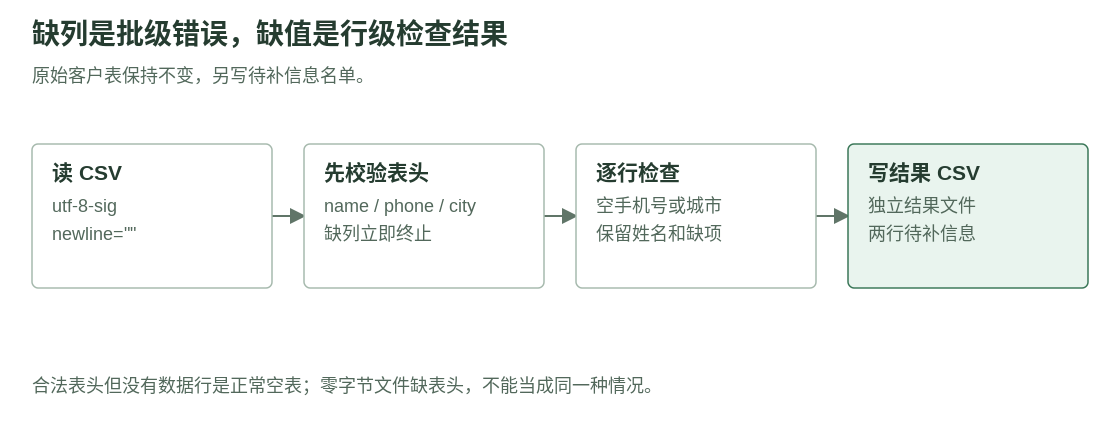
读取用 utf-8-sig 兼容 UTF-8 文件的可选 BOM,写入也使用该编码方便常见桌面表格软件识别。newline="" 把换行处理交给 CSV 模块。原文件不覆盖,结果固定写到 missing_customers.csv;重复运行会覆盖这一结果文件,如需保留每批结果,应另用批次目录。
运行示例
bash
python3 csv_cleaning.py先在脚本旁创建 customers.csv:
csv
name,phone,city
李雷,13800000001,上海
韩梅梅,,杭州
王芳,13900000003,
预期结果为两行:韩梅梅缺 phone、王芳缺 city。删除 phone 表头后,应在写结果前给出缺列错误;一份只有合法表头的空表应输出只有表头的结果。CSV 会保留手机号文本,但用表格软件再次打开时仍应将该列设为文本,防止软件自行转为数字。
完整示例
csv_cleaning.py
python
from __future__ import annotations

import csv
from pathlib import Path

base = Path(__file__).parent
input_file = base / "customers.csv"
output_file = base / "missing_customers.csv"


def main() -> None:
    with input_file.open("r", encoding="utf-8-sig", newline="") as file:
        reader = csv.DictReader(file)
        missing_headers = {"name", "phone", "city"} - set(reader.fieldnames or [])
        if missing_headers:
            raise ValueError(f"缺少表头:{sorted(missing_headers)}")
        rows = list(reader)

    missing = [row for row in rows if not row["phone"] or not row["city"]]

    with output_file.open("w", encoding="utf-8-sig", newline="") as file:
        writer = csv.DictWriter(file, fieldnames=["name", "missing"])
        writer.writeheader()
        for row in missing:
            fields = []
            if not row["phone"]:
                fields.append("phone")
            if not row["city"]:
                fields.append("city")
            writer.writerow({"name": row["name"], "missing": "|".join(fields)})

    print(f"已输出:{output_file.name},{len(missing)} 行")


if __name__ == "__main__":
    main()